Cloud PC: Empty your Downloads folder
Process
Step 1.
Open your Start Menu
(Windows icon on the bottom-left of your screen, or use the shortcut Ctrl + Esc)
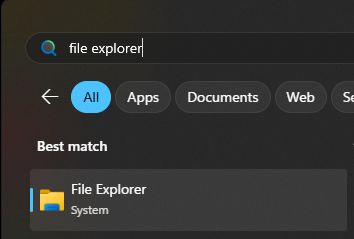
Step 2.
Search "File Explorer"
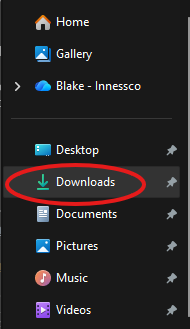
Step 3.
Navigate to your "Downloads" folder
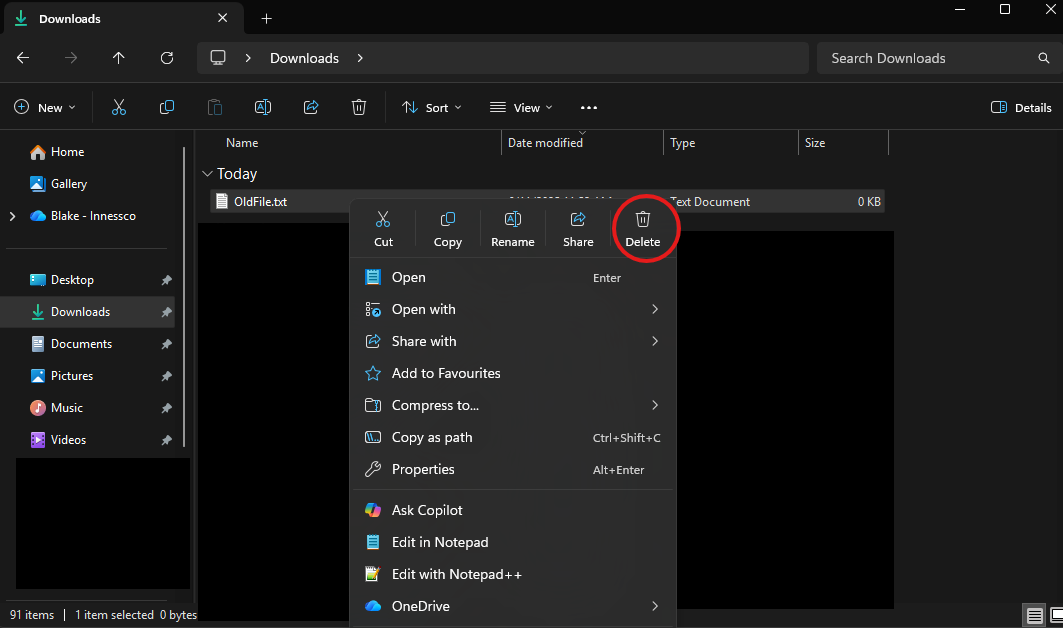
Step 4.
Right-Click and Delete any old Downloads you no longer need.
Note: if you need to select multiple files, you can do this by holding the CTRL button and left-clicking.
If you need to select ALL files, you can do this by using the shortcut CTRL+A .
Was this article helpful?
That’s Great!
Thank you for your feedback
Sorry! We couldn't be helpful
Thank you for your feedback
Feedback sent
We appreciate your effort and will try to fix the article