Cloud PC: Log Off
Table of Contents
- Key Points
- Detailed Process
Key Points
Step 1.
Right-click the Windows (Start) button on the taskbar.
Step 2.
Shut down or sign out → click Sign out.
Detailed Process
Step 1.
Right-click the Windows (Start) button on the taskbar.
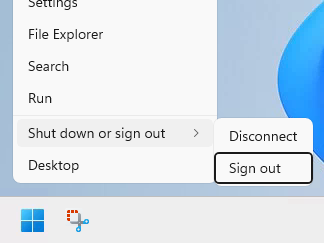
Step 2.
Shut down or sign out → click Sign out.
Was this article helpful?
That’s Great!
Thank you for your feedback
Sorry! We couldn't be helpful
Thank you for your feedback
Feedback sent
We appreciate your effort and will try to fix the article